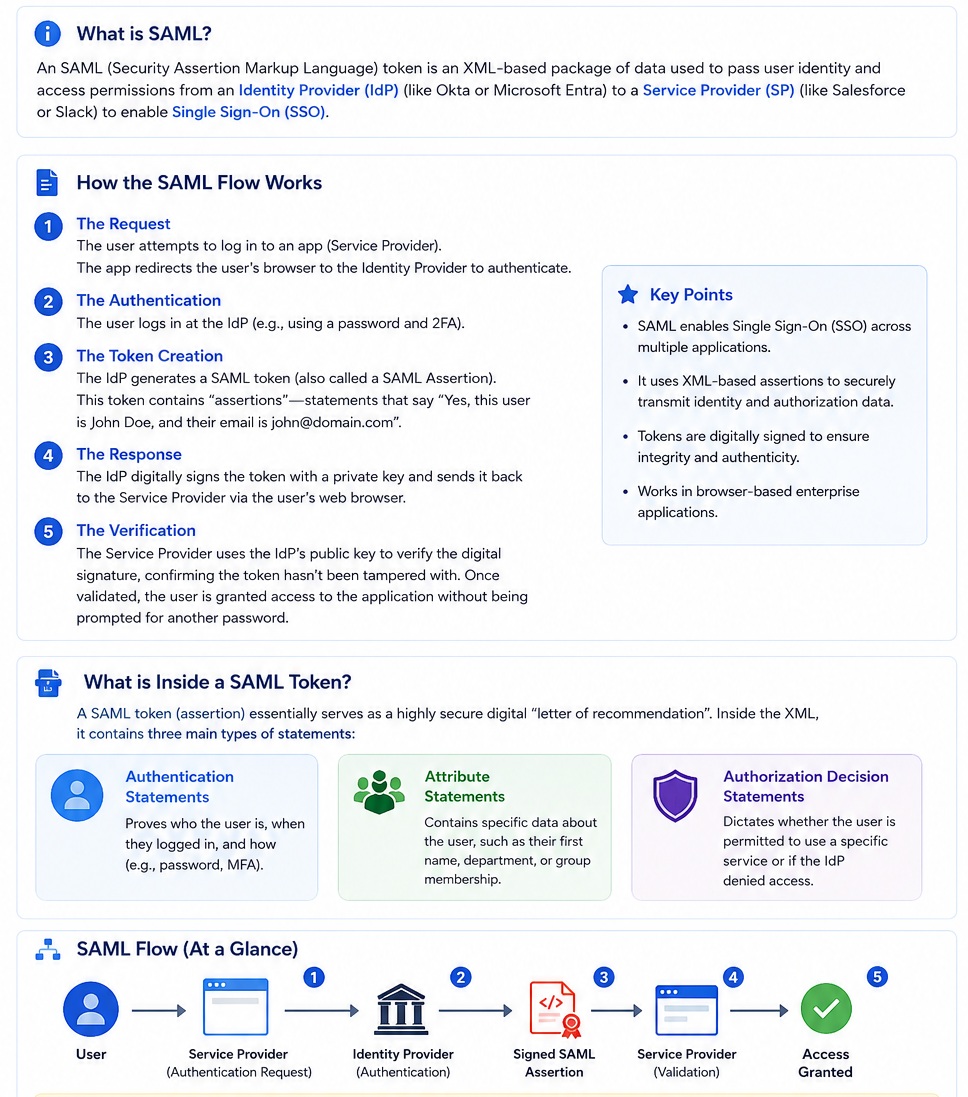
SAML Authentication Flow
SAML enables
Single Sign-On (SSO)
by allowing an
Identity Provider (IdP)
to authenticate a user once and securely share the user's identity with one or more
Service Providers (SP).
Instead of maintaining separate usernames and passwords for every application,
users authenticate only once with the Identity Provider and can then access
multiple applications without signing in again.
Overview
Security Assertion Markup Language (SAML)
is an XML-based open standard used to exchange authentication and authorization
information between an
Identity Provider (IdP)
and a
Service Provider (SP).
The Identity Provider authenticates the user and generates a
digitally signed
SAML Assertion.
The Service Provider validates the signature and grants access to
the requested application without asking the user to log in again.
SAML is one of the most widely used technologies for implementing
Enterprise Single Sign-On (SSO).
What is a SAML Token?
A
SAML Token,
also called a
SAML Assertion,
is an XML document generated by the Identity Provider after the
user has successfully authenticated.
The assertion securely communicates the user's identity and
additional information to the Service Provider.
A SAML Assertion is digitally signed using the Identity Provider's
private key, allowing the Service Provider to verify its authenticity
using the corresponding public key.
Key Components
| Component |
Description |
| User |
The person attempting to access a protected application.
|
| Service Provider (SP) |
The application that the user wants to access, such as
Salesforce, Workday, Slack, or AWS.
|
| Identity Provider (IdP) |
The trusted authentication server responsible for validating
the user's identity.
Examples include Microsoft Entra ID (Azure AD), Okta,
Ping Identity, and ADFS.
|
| SAML Assertion |
A digitally signed XML document containing authentication,
attribute, and authorization information.
|
| Digital Signature |
Ensures the SAML Assertion has not been modified during transmission
and confirms it originated from the trusted Identity Provider.
|
Why Use SAML?
- Provides Enterprise Single Sign-On (SSO).
- Reduces the number of passwords users must remember.
- Centralizes authentication in one trusted Identity Provider.
- Improves security by supporting Multi-Factor Authentication (MFA).
- Simplifies user provisioning and access management.
- Uses digital signatures to prevent token tampering.
- Widely adopted by enterprise cloud applications.
How the SAML Authentication Flow Works
The SAML authentication process consists of a sequence of interactions
between the user, the Service Provider (SP), and the Identity Provider (IdP).
The Service Provider never authenticates the user directly.
Instead, it trusts the Identity Provider to verify the user's identity.
Step-by-Step Authentication Process
| Step |
Description |
| 1. Authentication Request |
The user attempts to access a protected application
(Service Provider).
The Service Provider redirects the user's browser to the
Identity Provider and sends a
SAML Authentication Request.
|
| 2. User Authentication |
The Identity Provider authenticates the user.
Authentication may involve:
- Username and Password
- Multi-Factor Authentication (MFA)
- Smart Card
- Biometric Authentication
|
| 3. SAML Assertion Creation |
After successful authentication, the Identity Provider
creates a digitally signed
SAML Assertion
containing information about the authenticated user.
|
| 4. SAML Response |
The signed SAML Assertion is returned to the user's browser,
which automatically forwards it to the Service Provider.
|
| 5. Verification |
The Service Provider verifies the digital signature using
the Identity Provider's public key.
If the signature is valid, the assertion is trusted.
|
| 6. Access Granted |
After successful validation, the Service Provider creates
a user session and grants access to the requested application.
|
Detailed SAML Authentication Flow
The following diagram illustrates the complete interaction between
the User, Service Provider (SP), and Identity Provider (IdP) during
a SAML Single Sign-On (SSO) authentication process.
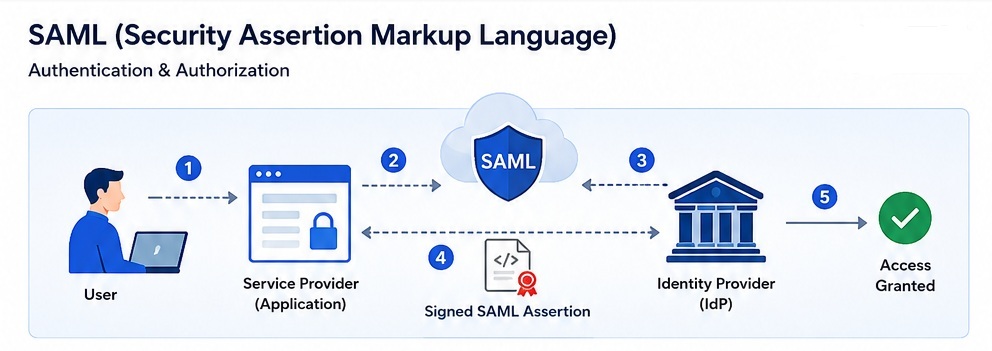
Figure.
Detailed view of the SAML authentication process, including
authentication request, user verification, signed SAML assertion,
signature validation, and access granted.
Detailed SAML Authentication Flow
User
 │
 │ 1. Access Application
 ▼

Service Provider (SP)
 │
 │ 2. Authentication Request
 ▼

Identity Provider (IdP)
 │
 │ 3. User Authentication
 │
 │ 4. Create Signed SAML Assertion
 ▼

User Browser
 │
 │ 5. Send SAML Response
 ▼

Service Provider
 │
 │ 6. Validate Signature
 ▼

Access Granted
Notice that the SAML Assertion is returned through the user's browser.
The browser simply transports the token; it cannot modify the
assertion because it is digitally signed by the Identity Provider.
What is Inside a SAML Assertion?
A SAML Assertion is an XML document containing one or more
security statements about the authenticated user.
| Statement Type |
Purpose |
| Authentication Statement |
Confirms that the user has been authenticated.
It may include:
- Authentication Time
- Authentication Method
- Session Expiration
|
| Attribute Statement |
Contains user attributes such as:
- Name
- Email Address
- Department
- Role
- Group Membership
|
| Authorization Decision Statement |
Specifies whether the user is permitted to access a
particular application or protected resource.
|
Sample SAML Assertion (Simplified)
A real SAML Assertion is an XML document generated by the
Identity Provider (IdP) after successfully
authenticating the user.
The following example is simplified to highlight the most
important elements commonly found inside a SAML Assertion.
<saml:Assertion>

    <saml:Issuer>

        https://login.microsoftonline.com/

    </saml:Issuer>

    <saml:Subject>

        <saml:NameID>

            john.doe@company.com

        </saml:NameID>

    </saml:Subject>

    <saml:Conditions>

        <saml:AudienceRestriction>

            <saml:Audience>

                https://salesforce.com

            </saml:Audience>

        </saml:AudienceRestriction>

    </saml:Conditions>

    <saml:AuthnStatement>

        Authentication Method = MFA

    </saml:AuthnStatement>

    <saml:AttributeStatement>

        Email = john.doe@company.com

        Department = Engineering

        Role = Administrator

    </saml:AttributeStatement>

</saml:Assertion>
Although a production SAML Assertion is considerably larger,
its overall structure follows the same pattern shown above.
Understanding the XML Elements
| Element |
Purpose |
| <Issuer> |
Identifies the Identity Provider (IdP) that created
the SAML Assertion.
|
| <Subject> |
Identifies the authenticated user.
|
| <NameID> |
The user's unique identifier.
Most commonly an email address or employee ID.
|
| <Conditions> |
Specifies when the assertion is valid and which
Service Provider is allowed to accept it.
|
| <Audience> |
Identifies the intended Service Provider that
may consume the assertion.
|
| <AuthnStatement> |
Contains information about the authentication,
including the authentication method and login time.
|
| <AttributeStatement> |
Contains user attributes such as name, email,
department, role, and group membership.
|
Typical SAML Assertion Structure
<saml:Assertion>

    Issuer

    Subject

    Conditions

    Authentication Statement

    Attribute Statement

    Digital Signature

</saml:Assertion>
Every SAML Assertion follows a similar structure.
The exact XML elements may vary depending on the Identity Provider,
but the overall organization remains consistent across
enterprise SAML implementations.
Why is the SAML Assertion Digitally Signed?
A SAML Assertion contains sensitive identity information.
To prevent tampering, the Identity Provider signs the XML
document using its private key.
The Service Provider verifies the signature using the
Identity Provider's public key.
Identity Provider

Private Key
      │
      ▼

Sign SAML Assertion

      │

      ▼

Service Provider

Public Key
      │
      ▼

Verify Signature

      │
      ▼

Trust the Identity
If the signature verification fails, the Service Provider
rejects the SAML Assertion and access is denied.
Authentication vs Authorization
| Authentication |
Authorization |
|
Verifies the identity of the user.
|
Determines what the authenticated user is allowed to access.
|
|
Performed by the Identity Provider.
|
Usually enforced by the Service Provider.
|
|
"Who are you?"
|
"What are you allowed to do?"
|
|
Uses passwords, MFA, certificates, biometrics, etc.
|
Uses roles, permissions, groups, and policies.
|
Advantages of SAML
- Provides Enterprise Single Sign-On (SSO).
- Users authenticate only once.
- Centralized authentication through the Identity Provider.
- Supports Multi-Factor Authentication (MFA).
- Reduces password fatigue.
- Uses digitally signed assertions for integrity.
- Eliminates password sharing between applications.
- Widely supported by enterprise cloud applications.
- Improves security and user experience.
SAML vs OAuth 2.0 vs JWT
| Feature |
SAML |
OAuth 2.0 |
JWT |
| Primary Purpose |
Authentication & SSO |
Authorization |
Token Format |
| Token Format |
XML |
Bearer Token |
JSON |
| Digital Signature |
Yes |
Optional |
Usually Signed |
| Enterprise SSO |
Excellent |
Limited |
No |
| Mobile APIs |
Rare |
Excellent |
Excellent |
| Cloud Applications |
Very Common |
Very Common |
Very Common |
Common Identity Providers
Many enterprise organizations use one of the following Identity Providers
to implement Single Sign-On using SAML.
- Microsoft Entra ID (Azure Active Directory)
- Okta
- Ping Identity
- ADFS (Active Directory Federation Services)
- Google Workspace
- IBM Security Verify
- Oracle Identity Cloud Service (IDCS)
- OneLogin
Security Best Practices
- Always use HTTPS for transmitting SAML messages.
- Verify the digital signature before trusting a SAML Assertion.
- Validate the issuer and audience.
- Reject expired assertions.
- Enable Multi-Factor Authentication (MFA).
- Protect the Identity Provider's private signing key.
- Rotate certificates periodically.
- Use short assertion expiration times.
Key Takeaways
- SAML is an XML-based standard for exchanging authentication and authorization information.
- SAML enables Enterprise Single Sign-On (SSO).
- The Identity Provider authenticates users.
- The Service Provider trusts the Identity Provider.
- SAML Assertions are digitally signed to prevent tampering.
- The browser transports the assertion but never authenticates the user.
- SAML is widely used by enterprise cloud applications.
Source Code
The complete Java source code for all SAML examples discussed on this page
is available on GitHub. The examples are designed to demonstrate the
fundamental concepts behind SAML Authentication and Single Sign-On (SSO)
using small, easy-to-understand Java programs.
| Java Example |
Description |
| CreateSAMLAssertion.java |
Demonstrates how a simplified SAML Assertion can be created as an XML document.
Introduces the core components of a SAML Assertion including the
Issuer, Subject, Authentication Statement, and Attribute Statement.
|
| ParseSAMLAssertion.java |
Shows how Java's DOM Parser can parse a SAML Assertion and extract
important information such as the authenticated user, issuer,
authentication method, and user attributes.
|
| SAMLBase64Encoding.java |
Demonstrates how SAML Assertions are Base64 encoded before transmission
and decoded by the Service Provider. Also explains why Base64 is an
encoding mechanism rather than an encryption technique.
|
| XMLDigitalSignatureExample.java |
Illustrates the cryptographic principle behind SAML Digital Signatures.
Demonstrates RSA key generation, digital signing, signature verification,
and explains how Identity Providers prove the authenticity of a SAML
Assertion.
|
| SAMLFlowSimulation.java |
Provides a step-by-step simulation of a complete SAML Single Sign-On (SSO)
authentication process, beginning with the user's login request and ending
with successful access to the protected application.
|
Topics Covered
- Structure of a SAML Assertion
- Identity Provider (IdP) and Service Provider (SP)
- Authentication Statements
- Attribute Statements
- XML Parsing using Java DOM Parser
- Base64 Encoding and Decoding
- RSA Public-Key Cryptography
- Digital Signatures
- Signature Verification
- SAML Authentication Flow
- Single Sign-On (SSO)
Together, these examples provide a practical introduction to the
technologies used by enterprise Identity Providers such as
Microsoft Entra ID, Okta,
Ping Identity, and other SAML-compliant authentication
platforms.
View Source Code on GitHub